1.1 A Brief Map Of Your Adventure
You'll give the following abilities to pyxc in stages:
- Read the characters typed in on the REPL or in your source file
- Group them into words
- Arrange the words into a hierarchy to make sense of them
- Translate what's been understood into a language LLVM will understand
- Let LLVM translate that into a language the computer understands
- Run the program
- Add features to the language that make it a joy to use. This has less to do with LLVM and more to do with designing a language that is general enough to solve a wide range of problems in a way that is amenable to how YOU think. Yes, you! This is where the power lies. There are A LOT of languages that can solve a wide range of problems. But you get to pick and choose the features you want, and implement them into a language of your choice. Isn't that exciting?!
- Brag/Profit/Do a little jiggy with it.
1. pyxc: Analyzing Program Words
1.2 Starting Small
Start small. First try and group a stream of characters (getchar() ahoy!) into words or more generically into individual units of the language.
For an input like:
def add(a, b): a + b # add.pyxc
you should print:
'def'
name: add
'('
name: a
','
name: b
')'
':'
name: a
'+'
name: b
newline
Notice how add(a, b) gets split into individual units: add, (, name: a, ,, name: b ) regardless of the spacing between them. This should tell you that there's more to your task than splitting it blindly at spaces. Furthermore, a and b have been tagged as name, which should tell you there's even a little bit more going on in there. And lastly see that while spaces are discarded (hint: so are tabs), newlines are recognized as true citizens.
The Lexer does not decide whether the program is grammatically valid.
1.3 Source Code
git clone --depth 1 https://github.com/alankarmisra/pyxc-llvm-tutorial
cd pyxc-llvm-tutorial/code/chapter-01
1.4 Create the Token Vocabulary
Go back to the example:
def add(a, b): a + b # add.pyxc
Pop quiz: Which comparison faster?
// string comparison
string str_word = "def";
if(str_word == "def") { ... }
Or
// int comparison
int def_tok = 1;
if(def_tok == 1) { ... }
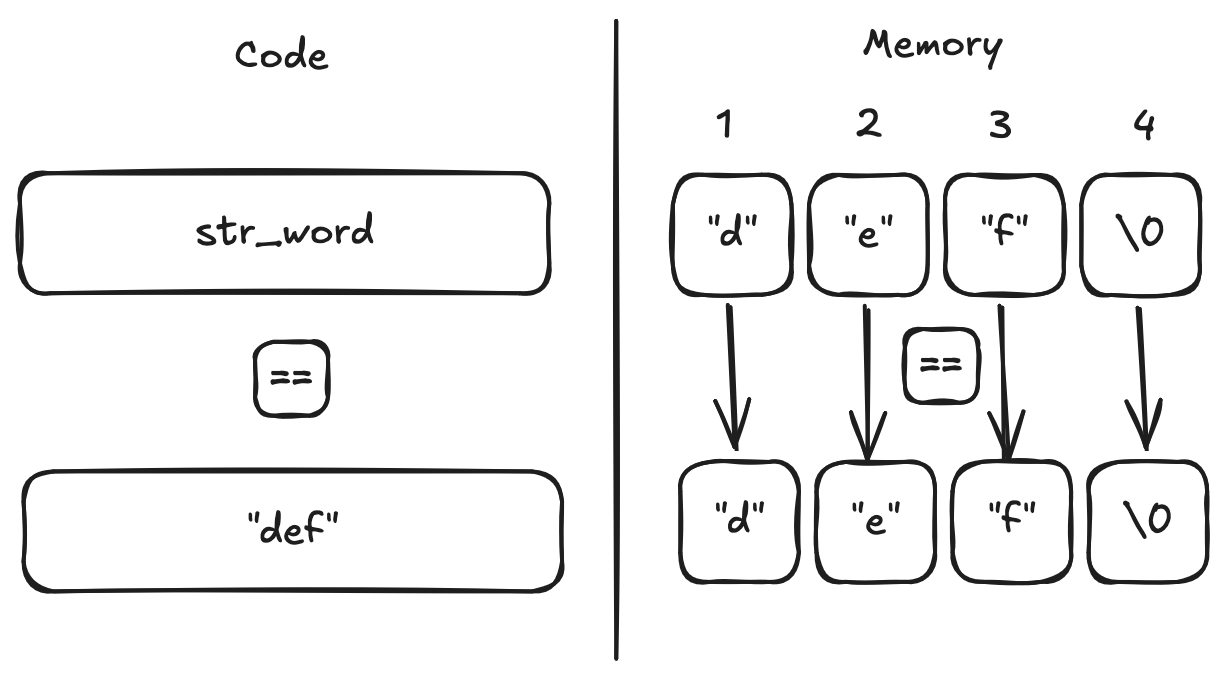
If you went with the string version, notice that comparing ["d", "e", "f", "\0"] (the contents of str_word) with ["d", "e", "f", "\0"] (the raw string) requires 4 comparisons in total, whereas the integer version takes only 1. Here, I made this nice diagram for you just to be condescending.
For an integer comparison, draw the diagram in your head. 1 == 1. 2 == 2. 3 == 3. You get it.
So yeah, when you first read a string def, swap it out for a number that represents def, and then you have access to cheap comparisons throughout your program. Now, you're not an uncivilized animal, so collect all your numbers into a nice enum.
Start typing furiously. In pyxc.cpp, define the tokens this chapter understands:
enum Token {
  // sneaky inserts
  tok_eof = 1, // end of input, in C++ this is usually EOF
  tok_eol, // a newline; since newlines are structural markers in pyxc
  tok_error, // obvio

  tok_def, // "def"
  tok_name, // [a-zA-Z_][a-zA-Z_0-9]*
  tok_number, // [0..9]

  tok_lparen, // '('
  tok_rparen, // ')'
  tok_comma, // ','
  tok_colon, // ':'
  tok_plus, // '+'
};
Notice I sneaked in tok_eof, tok_eol, tok_error - the comments in the code tell you why. Some tokens like tok_name and tok_number are meta-tokens in that they represent the token type (It's a name!), but not the actual token string (It's add!). You can't possibly have an enum for all the names a user could possibly invent or all the numbers the user would possibly use. Possibly. Supposebly.
Create two separate variables which will temporarily store the relevant name or number that was just read.
static string Name;
static double NumberValue;
The lexer only needs to track the last name or number read in. You will need to copy it to a more permanent structure later in the process.
Add the headers and namespace used by the lexer:
#include <cctype>
#include <cstdio>
#include <cstdlib>
#include <map>
#include <string>

using namespace std;
I never know which header is for what. I just try all of them until one sticks.
1.5 Normalize Newlines
Old Mac OS used \r for a newline, modern macOS and Unix use \n, and Windows uses \r\n.

Make all three look like \n to the lexer:
int advance() {
  int LastChar = getchar();

  if (LastChar == '\r') {
    int NextChar = getchar();
    if (NextChar != '\n' && NextChar != EOF)
      ungetc(NextChar, stdin);
    return '\n';
  }

  return LastChar;
}
You will now call advance() anywhere you get a getchar() itch:
1.6 Separate Keywords from Names
Keywords like def are a sequence of alphabets. So are function names like add and parameter names. Create a Keywords map with a singular item:
static map<string, Token> Keywords = {
    {"def", tok_def},
};
When you read in a sequence of characters, check if it's a keyword and return the keyword token if it is. If it isn't, copy the sequence into Name and return tok_name.
1.7 Keep One Character of Lookahead
You now have the basics to start converting characters into tokens. Write getToken() to begin the process:
int getToken() {
  static int LastChar = ' ';

  while (isspace(LastChar) && LastChar != '\n')
    LastChar = advance();
LastChar is the next character not yet assigned to a token. It survives between calls, giving the lexer one character of lookahead without a separate buffer. Seeding it with a space (not a character from the file) makes the loop above skip leading whitespace correctly on the very first call too.
Skip horizontal whitespace, but do not skip newlines. Newlines will become tokens because the parser will eventually use them to separate top-level forms.
1.8 Read Names and Keywords
Add the first token branch:
if (isalpha(LastChar) || LastChar == '_') {
  string NameLiteral;
  NameLiteral = LastChar;

  while (isalnum(LastChar = advance()) || LastChar == '_')
    NameLiteral += LastChar;

  auto KeywordIt = Keywords.find(NameLiteral);
  if (KeywordIt != Keywords.end())
    return KeywordIt->second;

  Name = NameLiteral;
  return tok_name;
}
When the loop stops, LastChar already contains the first character belonging to the next token. Leave it there for the next getToken() call.
1.9 Read Numbers
Add numeric literals next:
if (isdigit(LastChar) || LastChar == '.') {
  string NumberLiteral;

  do {
    NumberLiteral += LastChar;
    LastChar = advance();
  } while (isdigit(LastChar) || LastChar == '.');

  NumberValue = strtod(NumberLiteral.c_str(), 0);
  return tok_number;
}
This intentionally accepts a broad sequence of digits and dots — anything matching [0-9.]+ — and hands the whole thing to strtod, which parses as much of a valid number as it can from the front and stops.
That's fine for 42, 3.14, and .5. It's not fine for something like 1.23.45.67: the loop above still consumes every character of it into NumberLiteral, but strtod only converts the 1.23 prefix and silently ignores the rest. The .45.67 doesn't become a token and doesn't raise an error — it has already been consumed from the input stream by the time strtod gives up on it, so it just disappears. Chapter 5 adds real validation to reject input like this outright; for now, this is a known bug, not a corner case worth chasing here.
1.10 Discard Comments but Preserve Their Newline
Add:
if (LastChar == '#') {
  do {
    LastChar = advance();
  } while (LastChar != '\n' && LastChar != EOF);

  if (LastChar == '\n') {
    LastChar = advance();
    return tok_eol;
  }
}
The comment text disappears, but the line boundary remains — a comment-only line still produces a tok_eol, the same as a blank line would.
1.11 Recognize Newline and EOF
Add these checks after comment handling:
if (LastChar == '\n') {
  LastChar = advance();
  return tok_eol;
}

if (LastChar == EOF)
  return tok_eof;
tok_eol separates forms. tok_eof tells the driver to stop asking for tokens.
1.12 Recognize One-Character Tokens
Finish getToken() with:
int ThisChar = LastChar;
LastChar = advance();

switch (ThisChar) {
case '(':
  return tok_lparen;
case ')':
  return tok_rparen;
case ',':
  return tok_comma;
case ':':
  return tok_colon;
case '+':
  return tok_plus;
default:
  return tok_error;
}
}
Consume the character before returning. Otherwise the next call would report the same token forever.
1.13 Create a Token mapping back to strings for debug output
Add readable token names for the driver:
static map<int, string> TokenNames = {
    {tok_eof, "end of input"}, {tok_eol, "newline"},
    {tok_error, "error"},      {tok_def, "'def'"},
    {tok_name, "name"},        {tok_number, "number"},
    {tok_lparen, "'('"},       {tok_rparen, "')'"},
    {tok_comma, "','"},        {tok_colon, "':'"},
    {tok_plus, "'+'"},
};
1.14 Add a Token-Printing Driver
Use the lexer until it returns tok_eof:
int main() {
  int Token;

  while ((Token = getToken()) != tok_eof) {
    if (Token == tok_name)
      fprintf(stdout, "%s: %s\n", TokenNames.at(Token).c_str(),
              Name.c_str());
    else if (Token == tok_number)
      fprintf(stdout, "%s: %g\n", TokenNames.at(Token).c_str(),
              NumberValue);
    else
      fprintf(stdout, "%s\n", TokenNames.at(Token).c_str());
  }

  return 0;
}
tok_name and tok_number print their attached value; every other token prints its own name, since the token itself is the whole story. This driver is temporary — Chapter 2 replaces it with a parser — but it gives the lexer a clean, observable output today.
1.15 Build and Run
Configure and compile:
cmake -S . -B build
cmake --build build
Run the sample:
printf 'def add(a, b): a + b\n' | ./build/pyxc
Expected:
'def'
name: add
'('
name: a
','
name: b
')'
':'
name: a
'+'
name: b
newline
Try a comment and decimal:
printf '# value\n12.5\n' | ./build/pyxc
Expected:
newline
number: 12.5
newline
Now trigger the number-parsing bug from step 6 directly:
printf '1.23.45.67\n' | ./build/pyxc
Expected:
number: 1.23
newline
.45.67 never appears — not as a second number, not as an error. That's the bug: it was already consumed off the input stream before strtod got a chance to reject it.
1.16 Run the Tests
Use LLVM's lightweight test runner if it is already available:
llvm-lit -v test/
The chapter tests cover names, underscores, integers, decimals, comments, punctuation, unknown characters, token boundaries, and newline normalization. If the # RUN:/# CHECK: lines inside those test files don't make sense yet, Appendix 1 walks through exactly how lit reads and runs them.
A clean llvm-lit run only means those specific tests pass, not that everything worth testing has been tested. Appendix 2 covers checking that more rigorously with LLVM's own coverage tooling.
What you built is intentionally narrow:
one call to getToken() -> one token and optional payload
Next: Chapter 2 consumes those tokens and builds a syntax tree.